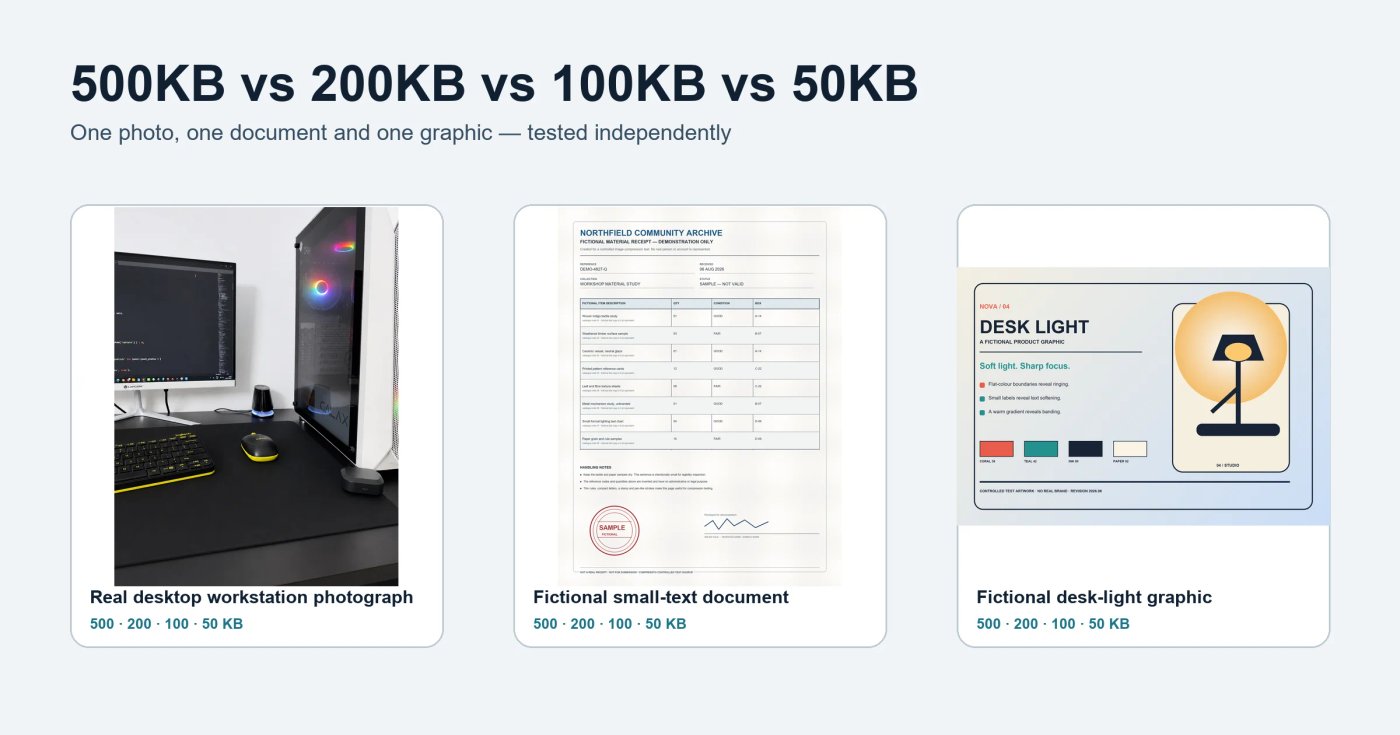
Is 500KB visibly better than 200KB? Is 100KB still clear enough for an online form? And what actually happens when the same image is reduced to 50KB?
Generic answers are not very useful because file size alone does not determine image quality. A detailed photograph, a document containing small text, and a clean product graphic do not react to compression in the same way. We therefore tested all four limits on three project-owned images selected or created for this comparison.
Each untouched original was compressed independently to 500KB, 200KB, 100KB and 50KB using the same CompressTo settings. We then checked exact file size, pixel dimensions, reduction, resizing and visible changes at both normal viewing size and 100% zoom.
The short answer
For the genuine desktop-workstation photograph, 100KB was the best practical balance: it retained the original 1086×1448 dimensions and looked clean at normal size, with only slight fine-detail softening at 100% zoom. At 50KB, CompressTo resized it to 923×1231 and small on-screen code and case detail softened further. The fictional small-text document balanced best at 200KB, while the simpler product graphic held up well at 100KB. The results do not identify one universal winner because each subject preserves different details.
The important lesson is that the best target is not always the smallest file you can produce. It is the smallest file that meets the upload limit while keeping the details that matter for its intended use.
If you already know your required limit, you can use the dedicated 500KB compressor, 200KB compressor, 100KB compressor or 50KB compressor.
What we tested
We used three newly created, project-owned subjects so the comparison would cover different compression challenges:
- A genuine desktop-workstation photograph with small on-screen code, dark surfaces, reflective glass, perforated case details and coloured RGB lighting.
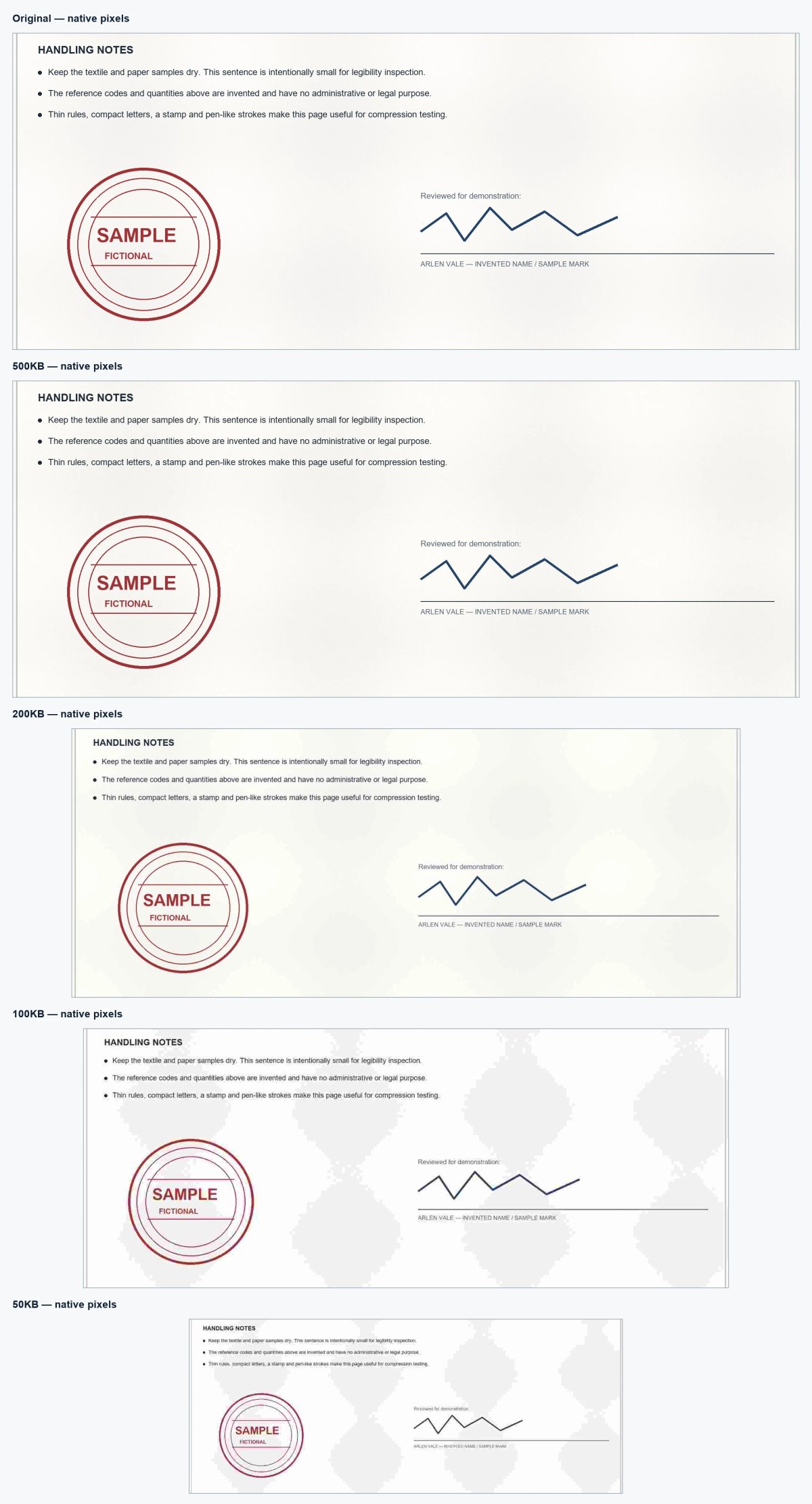
- A fictional document with small text, thin rules, a stamp and signature-like marks. It contains no real personal information.
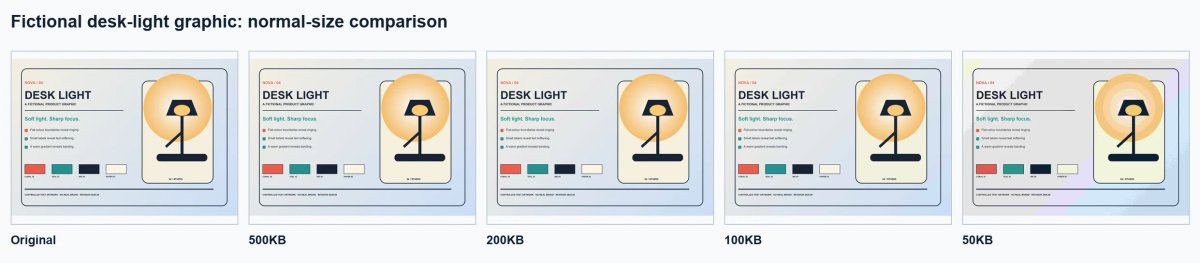
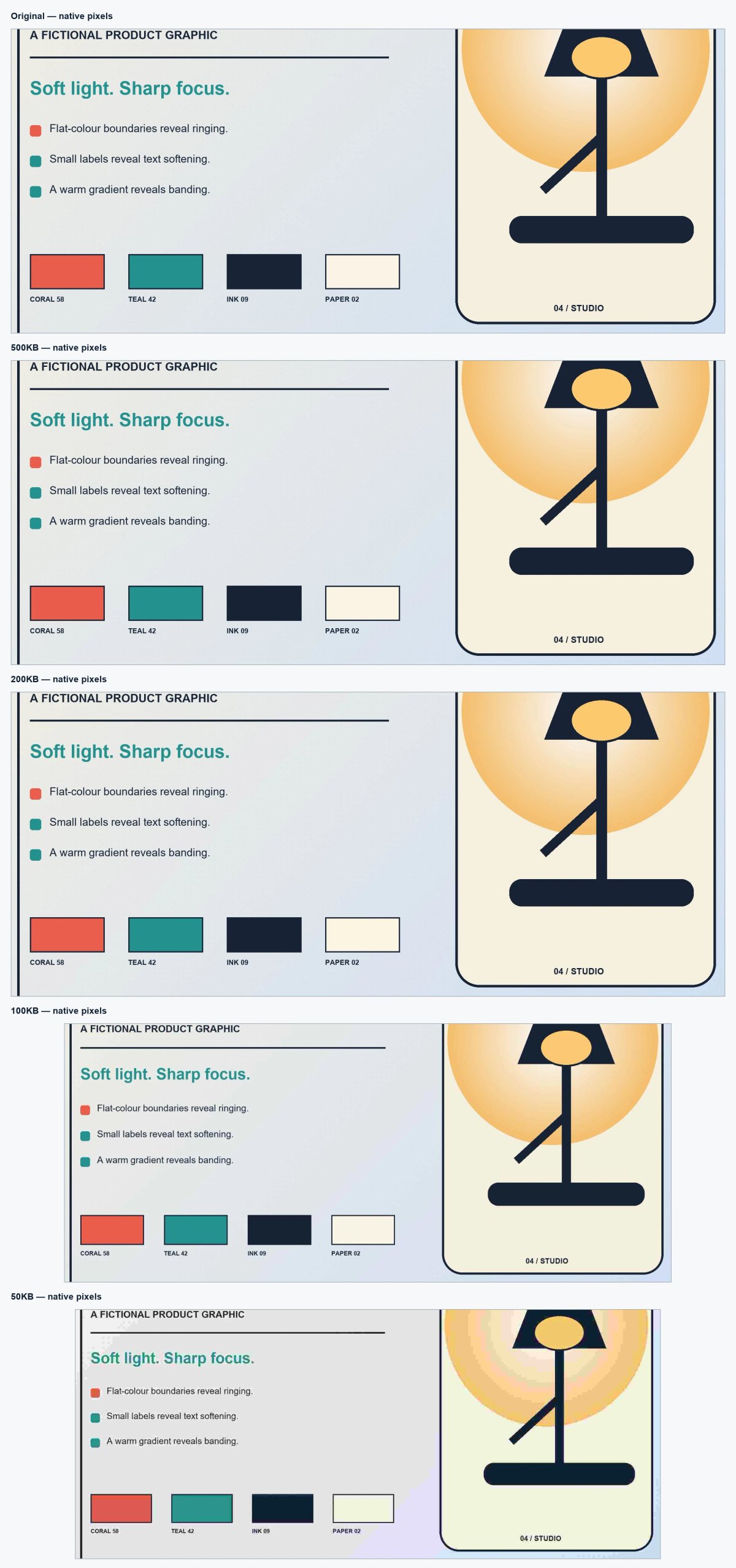
- A product-style graphic with flat colours, sharp edges and logo-like text.
All three originals were larger than 500KB before testing. They were not reused from our earlier format or dimensions experiments, and no artificial padding was added to increase their size.
Original test files
| Test subject | Original format | Original dimensions | Original bytes | Original size |
|---|---|---|---|---|
| Genuine desktop-workstation photograph | PNG | 1086×1448 | 1,734,688 | 1694.03125 KB |
| Fictional small-text document | PNG | 2400×3200 | 4,186,583 | 4088.4599609375 KB |
| Product-style graphic | PNG | 2600×1800 | 3,539,570 | 3456.611328125 KB |
How we made the comparison fair
For every subject, we returned to the untouched original before creating each target. The 200KB image was not made from the 500KB result, and the 100KB and 50KB versions were not compressed from earlier outputs. This prevents cumulative recompression from making the smaller files look worse than a genuine one-step result.
The controlled settings were:
- The same production CompressTo compression engine for all 12 outputs
- One fixed output format: JPEG
- Preserve dimensions turned off
- The same browser, browser version and device environment
- One independent compression from the original for each target
- File size calculated as bytes ÷ 1,024
- No manual editing, sharpening or post-processing after compression
JPEG was held constant so this test isolates the effect of the file-size target. WebP may behave differently at the same limit; our separate JPG vs PNG vs WebP test examines format differences.
We recorded the downloaded file's exact byte count, dimensions, reduction percentage, resize status and SHA-256 checksum. We also inspected important areas at normal display size and at 100% zoom. A checksum does not measure quality; it simply helps identify the exact file that produced each reported result.
The test ran on 8 August 2026 in Chromium 151.0.7922.76 on Windows against the production worker identified as `compressor.worker-Bv-t9fAi.js`. The repository was at commit `a2e9d3cc60525f1a33a78d6df2a600605956ec77`. The downloadable JSON manifest and CSV results contain exact bytes, decoded dimensions and SHA-256 checksums for every original and output. Reduction percentages below show verified calculations truncated with an ellipsis; exact byte counts are canonical.
Complete 500KB, 200KB, 100KB and 50KB results
| Final bytes | Final size | Final dimensions | Reduction | Resized? |
|---|---|---|---|---|
| Real workstation photo | 500KB | 251,919 | 246.0146484375 KB | 1086×1448 |
| Real workstation photo | 200KB | 201,519 | 196.7958984375 KB | 1086×1448 |
| Real workstation photo | 100KB | 93,130 | 90.947265625 KB | 1086×1448 |
| Real workstation photo | 50KB | 49,887 | 48.7177734375 KB | 923×1231 |
| Small-text document | 500KB | 467,052 | 456.10546875 KB | 2400×3200 |
| Small-text document | 200KB | 189,990 | 185.537109375 KB | 2040×2720 |
| Small-text document | 100KB | 91,171 | 89.0341796875 KB | 1968×2624 |
| Small-text document | 50KB | 50,326 | 49.146484375 KB | 1323×1764 |
| Product graphic | 500KB | 503,545 | 491.7431640625 KB | 2600×1800 |
| Product graphic | 200KB | 181,949 | 177.6845703125 KB | 2600×1800 |
| Product graphic | 100KB | 94,947 | 92.7216796875 KB | 2210×1530 |
| Product graphic | 50KB | 50,423 | 49.2412109375 KB | 2132×1476 |
The four labels are maximum ceilings, not guaranteed output sizes. CompressTo does not add padding or deliberately lower quality merely to make a download land near the selected number. In the workstation-photo test, selecting the 500KB ceiling legitimately produced 251,919 bytes (246.01KB when rounded to two decimals) because the browser's JPEG encoder had already returned the highest-quality result used by the production compression search; adding unused bytes would not create meaningful image information. It is therefore a 251,919-byte result from the 500KB test, not a “500KB file.” The relevant checks are that every output stays at or below its ceiling and that its appearance and dimensions remain suitable for the intended use.
Test 1: A genuine desktop-workstation photograph
Photographic scenes are demanding because texture, gradual colour changes, hair, foliage, fabric, reflections, grain and shadows all require data. Compression can simplify those details or create blockiness and smearing, especially when a strict target leaves little room for a large image.
Photo comparison
| Target | Normal viewing size | What changed at 100% zoom |
|---|---|---|
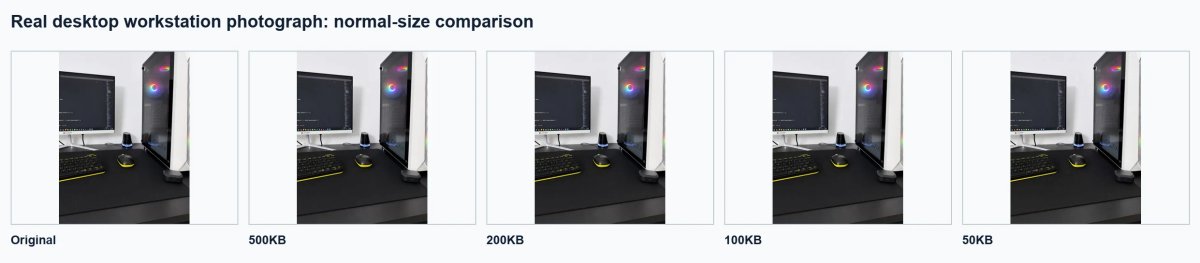
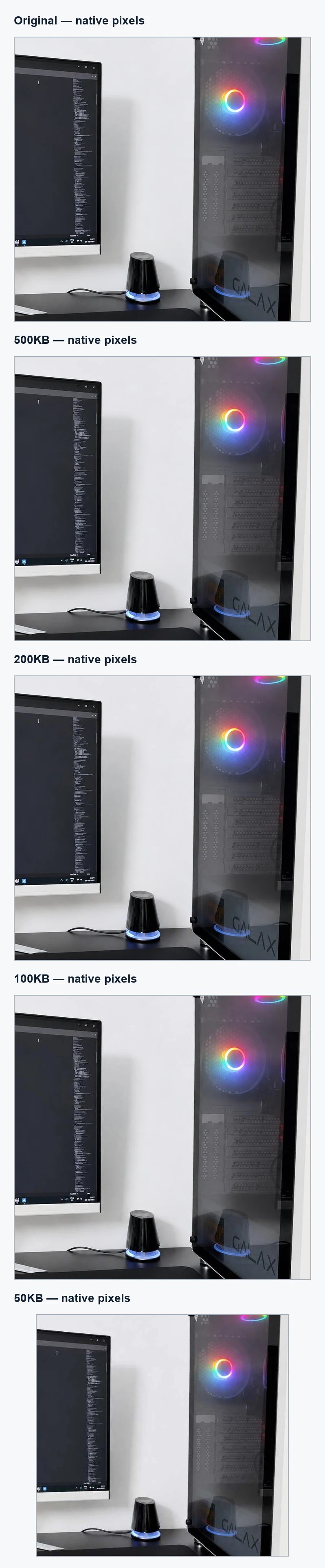
| 500KB | Indistinguishable from the original in the normal-size panel, despite finishing well below the selected ceiling. | Small monitor code, RGB rings, glass reflections and perforated case details remained crisp; only very slight smoothing was visible beside the original. |
| 200KB | Also looked effectively unchanged at the tested display size. | Fine code strokes and repeated case perforations remained distinct, with minimal smoothing in the dark glass and wall gradient. |
| 100KB | Clean and detailed at normal size with the original dimensions preserved. | The smallest on-screen code and subtle glass texture softened slightly, while the RGB rings, hard case edges and dark desk surface remained coherent. |
| 50KB | The complete workstation remained clear, but the image was smaller and fine details looked less precise. | After resizing to 923×1231, tiny code, perforations and reflections softened further; RGB and pale-wall gradients showed mild stepping. |
What the photo test showed: The first clearly visible trade-off arrived at 50KB, where CompressTo reduced the genuine photograph from 1086×1448 to 923×1231 and fine monitor and case details softened. The 500KB, 200KB and 100KB outputs all preserved the original dimensions. For this clean workstation photograph at the tested display size, 100KB was the best practical balance.
Test 2: A fictional document with small text
Documents need a different kind of quality. A slight loss of texture may not matter, but a broken letter, blurred number, uneven rule or damaged stamp can affect readability. That makes small text and thin lines more important than photographic richness.
Document comparison
| Target | Normal viewing size | What changed at 100% zoom |
|---|---|---|
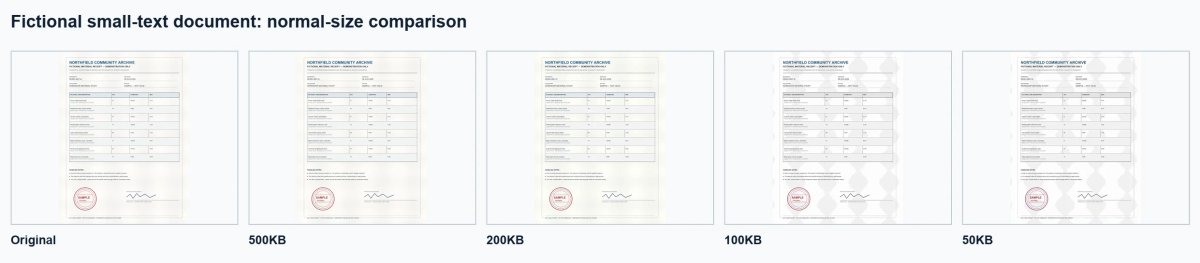
| 500KB | The full page remained crisp and comfortably readable. | Small handling notes, thin rules, stamp rings and the invented signature-like stroke stayed clean; paper grain was slightly smoother. |
| 200KB | The complete document remained readable after resizing to 2040×2720. | Small text softened slightly and the pale paper showed mild broad tonal patches, but letters, rules, stamp rings and signature-like marks remained distinct. |
| 100KB | Still readable as a complete document at 1968×2624, though pale block patterns were visible across the page. | The smallest lines were softer, fine stamp rings looked less even, and large grey macroblock shapes became conspicuous in blank areas. |
| 50KB | Headings and main fields remained recognisable, but the reduction to 1323×1764 made fine text less dependable. | Tiny labels and notes lost crispness, thin rules weakened, and strong macroblock patterns dominated the paper background around the stamp and signature-like mark. |
What the document test showed: Small-text and thin-line clarity first changed at 200KB, where the page was reduced by 15% in each dimension, but the complete document remained readable through 100KB. At 50KB, a 44.875% reduction in width and height combined with visible macroblocking made the smallest text too fragile for a document whose fine details matter. For this exact fictional page, 100KB was the smallest defensible reading copy, while 200KB was the better practical balance.
Test 3: A product-style graphic
Product graphics often combine smooth backgrounds, flat colour areas, crisp boundaries and text. These elements can expose ringing, colour bleeding and soft edges that may not be obvious in a photograph. A simple graphic may also compress efficiently, so a smaller file does not automatically mean a poor result.
Product-graphic comparison
| Target | Normal viewing size | What changed at 100% zoom |
|---|---|---|
| 500KB | Matched the original closely at normal size. | Small labels, navy outlines and swatch boundaries stayed crisp; the warm glow remained smooth. |
| 200KB | Still looked effectively unchanged in the normal-size panel. | A little smoothing appeared in the finest text and paper-dot texture, but flat colours, edges and the gradient remained controlled. |
| 100KB | Clean and readable after resizing to 2210×1530. | Small labels softened slightly, while high-contrast edges remained solid and the warm gradient showed only mild stepping. |
| 50KB | The layout and text remained recognisable, but broad colour blocks were obvious. | Strong banding formed in the circular glow, pale background fields broke into large tinted regions, and some small labels and dark edges gained visible ringing. |
What the graphic test showed: The first text softening appeared at 100KB, when CompressTo reduced the graphic by 15% in each dimension; that resize kept edges and labels usable and made 100KB the smallest acceptable target for this subject. The 50KB run reduced the original by 18% in each dimension, but the extra compression still produced obvious gradient bands and large colour blocks.
What changes as the target becomes smaller?
Reducing the target from 500KB to 50KB gives the encoder only one-tenth of the maximum file-size allowance. It can respond by lowering encoding quality, reducing pixel dimensions when resizing is permitted, or combining both approaches.
Those changes can appear in several ways:
- Fine textures may look smoother or less distinct.
- Small text and thin lines may soften.
- High-contrast edges may develop halos or ringing.
- Flat colour areas may show uneven blocks or bands.
- Dark or noisy regions may lose detail sooner than clean areas.
- Reduced dimensions may look acceptable on a small screen but provide less detail when enlarged.
These are possible effects, not guaranteed outcomes at a particular number of kilobytes. Image complexity, original dimensions and output format all influence what the encoder can preserve.
Which target should you choose?
Use the destination's maximum file size as the starting point. If a form allows up to 200KB, there is normally no benefit in forcing the file to 50KB unless you have another reason to make it smaller.
Choose 500KB when
- The destination permits it and fine photographic detail matters.
- The image will be viewed relatively large.
- You need a lighter alternative to a multi-megabyte original without imposing an extreme limit.
- A portfolio, product, property or editorial image deserves more visual room.
Choose 200KB when
- You need a practical balance for many web images or form uploads.
- The subject includes moderate detail but does not need to support heavy enlargement.
- A 500KB ceiling is unnecessary or exceeds the receiving site's limit.
Choose 100KB when
- A portal or workflow has a stricter maximum.
- The image will usually appear at a modest display size.
- You have checked that important faces, text, edges and dimensions remain usable.
Choose 50KB when
- The receiving portal explicitly requires a very small file.
- The subject is simple, tightly cropped or intended for a small display area.
- You have carefully checked readability, dimensions and visible artifacts before submission.
Do not judge acceptance from file size alone. Online portals may also require a particular format, width, height, aspect ratio, background, colour mode, or minimum file size. Our guide to image dimensions versus file size explains why an image can meet the KB limit and still fail another upload rule.
Why two images at 100KB can look completely different
A kilobyte measures data, not visual quality. Two 100KB images can differ because of:
- Subject complexity: clean backgrounds are easier to compress than foliage, hair or visual noise.
- Pixel dimensions: the same byte budget is spread across more pixels in a larger image.
- Format: JPEG and WebP do not encode every subject in the same way.
- Original quality: blur, noise and previous compression affect the next result.
- Resizing: a smaller, cleaner image can look better at normal size than a large image encoded too aggressively.
- Viewing conditions: artifacts that are invisible in a small preview may appear at 100% zoom or in print.
This is why our conclusion is subject-specific. The four targets are not quality grades, and a larger file is not automatically better if its extra data is unnecessary for the intended display.
How to compare the four targets with your own image
- Open the CompressTo image compressor.
- Add your original image. Processing takes place in your browser; the image file, its contents and its filename are not uploaded to a CompressTo server.
- Choose the largest permitted target first and compress the untouched original.
- Check the final file size, dimensions and before-and-after preview.
- Recompress from the original at the next smaller target.
- Compare faces, text, edges and important detail at the size people will actually view.
- Download the smallest result that satisfies both the upload rules and your visual needs.
If the destination requires exact width and height, enable Preserve dimensions and expect the compressor to rely more heavily on encoding quality. If the dimensions are flexible, leaving the option off gives the tool another way to reach a strict size while retaining a useful visual result.
Final verdict
The best practical target depended on the subject. 100KB gave the genuine workstation photograph the strongest balance: its 1086×1448 dimensions stayed intact and the normal-size image looked clean, while 100% inspection revealed only slight softening in tiny monitor code and glass detail. The 50KB version resized to 923×1231. 200KB remained the safer balance for the small-text document, which resized from 2400×3200 to 2040×2720. The simpler product graphic stayed convincing at 100KB after resizing from 2600×1800 to 2210×1530, with only slight small-text softening at 100% zoom.
Choose the largest file-size limit the destination permits when important detail benefits from it, then compare smaller targets from the untouched original. A strict 50KB requirement can be valid: every 50KB output here met its limit and remained recognisable. But all three also showed meaningful trade-offs, so 50KB should not be chosen merely because it is the smallest option.
Ready to test your own file? Use CompressTo to compare targets privately in your browser, with no signup required.