Choosing between JPG, PNG and WebP sounds simple until the same image produces three very different file sizes.
The short answer is:
- JPG is usually a practical choice for photographs, especially when broad compatibility matters.
- PNG is often best for screenshots, text, line art and graphics that must remain exact.
- WebP frequently creates the smallest web-ready file and supports both transparency and lossy or lossless compression.
But the smallest file is not always the best file. A format can reduce size by discarding image information, removing transparency or softening sharp edges. The right choice depends on what the image contains and where you plan to use it.
To move beyond generic advice, we encoded three different images—a photograph-style scene, a text-heavy interface screenshot and a transparent logo—as JPG, PNG and WebP. Here are the measured results and what they mean in practice.
Quick comparison: JPG vs PNG vs WebP
| Feature | JPG/JPEG | PNG | WebP |
|---|---|---|---|
| Compression | Lossy | Lossless | Lossy or lossless |
| Transparency | No | Yes | Yes |
| Typical strength | Photographs and universal sharing | Screenshots, text, logos and exact graphics | Smaller images for modern websites |
| Typical weakness | Can blur text and create edge artefacts | Can be unnecessarily large for photos | Some older software and upload portals may reject it |
| Best default use | Photos sent to forms, email or older systems | Graphics requiring exact pixels or transparency | Website delivery when the receiving system accepts WebP |
JPG and JPEG refer to the same image format. The shorter .jpg extension became common because older systems limited file extensions to three characters.
Our test method
We used three original, deterministic source images generated by the project test script, with very different visual characteristics:
- A 640 × 427 photograph-style scene containing sky, foliage, water and detailed architecture.
- A 1200 × 800 interface screenshot containing large text, smaller text, buttons, borders and flat colours.
- A 1200 × 800 logo-style graphic with sharp shapes, text and a transparent background.
Each source was decoded to pixels and exported at the same dimensions in all three formats. PNG used optimized lossless encoding. JPG and WebP used a quality setting of 82 with encoder optimization enabled. JPG used 4:2:0 chroma subsampling. WebP used method 6. JPG cannot preserve transparency, so the transparent graphic was placed on a white background for its JPG version.
The files were encoded with Pillow 12.2.0, libjpeg-turbo 3.1.4.1 and libwebp 1.6.0. File sizes below use 1 KB = 1,024 bytes. The source generation, exact settings, byte counts and SHA-256 checksums are included with the project package.
Test 1: A detailed photograph
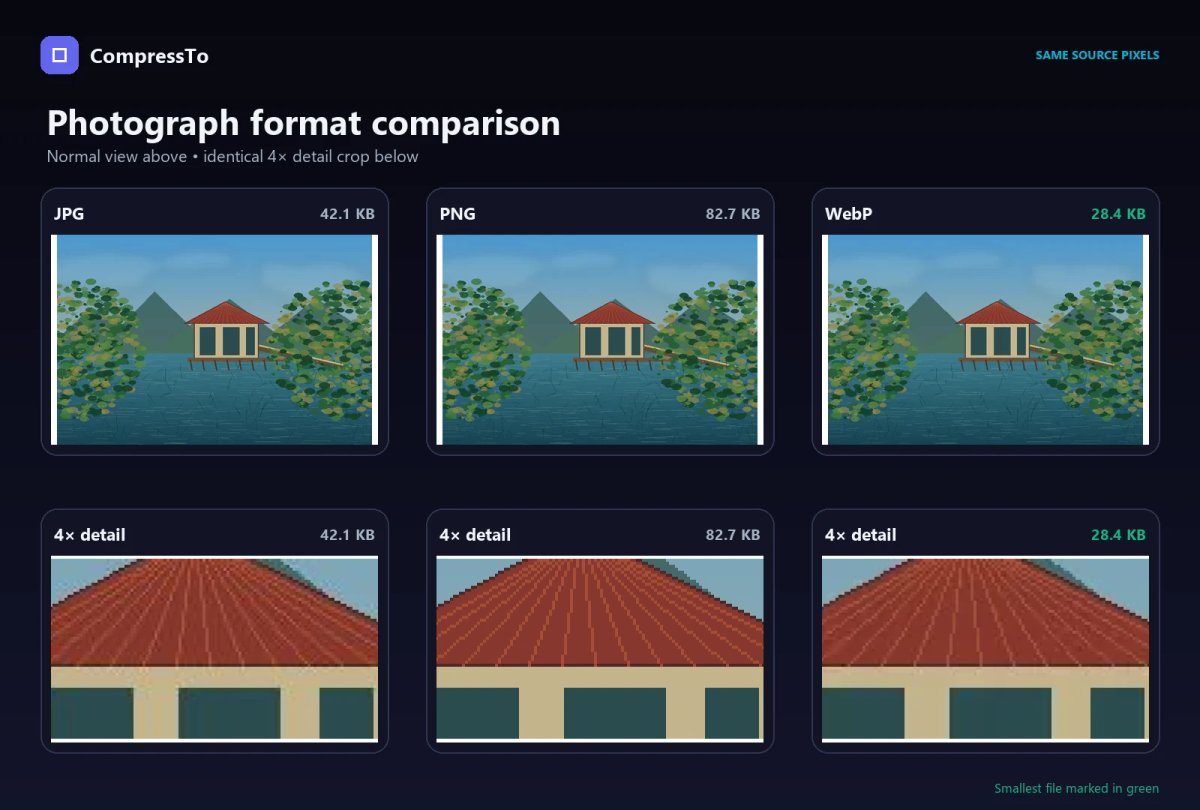
| Format | File size | What we observed |
|---|---|---|
| JPG | 42.1 KB | Good overall detail; slight compression loss when closely enlarged |
| PNG | 82.7 KB | Exact pixels, but larger than necessary for normal photo use |
| WebP | 28.4 KB | Smallest file; appearance remained close to the JPG at normal viewing size |
Winner for smallest size: WebP. It was about 33% smaller than the JPG in this test.
The lossless PNG was nearly twice the size of the JPG. That extra size preserved the generated source pixels exactly, but most website visitors would receive little practical benefit from the larger file for this kind of detailed scene.
For a photograph on a modern website, WebP is a strong first choice. JPG remains sensible when the image must open in almost any editor, device, email client or application portal.
Test 2: A screenshot containing text and interface elements
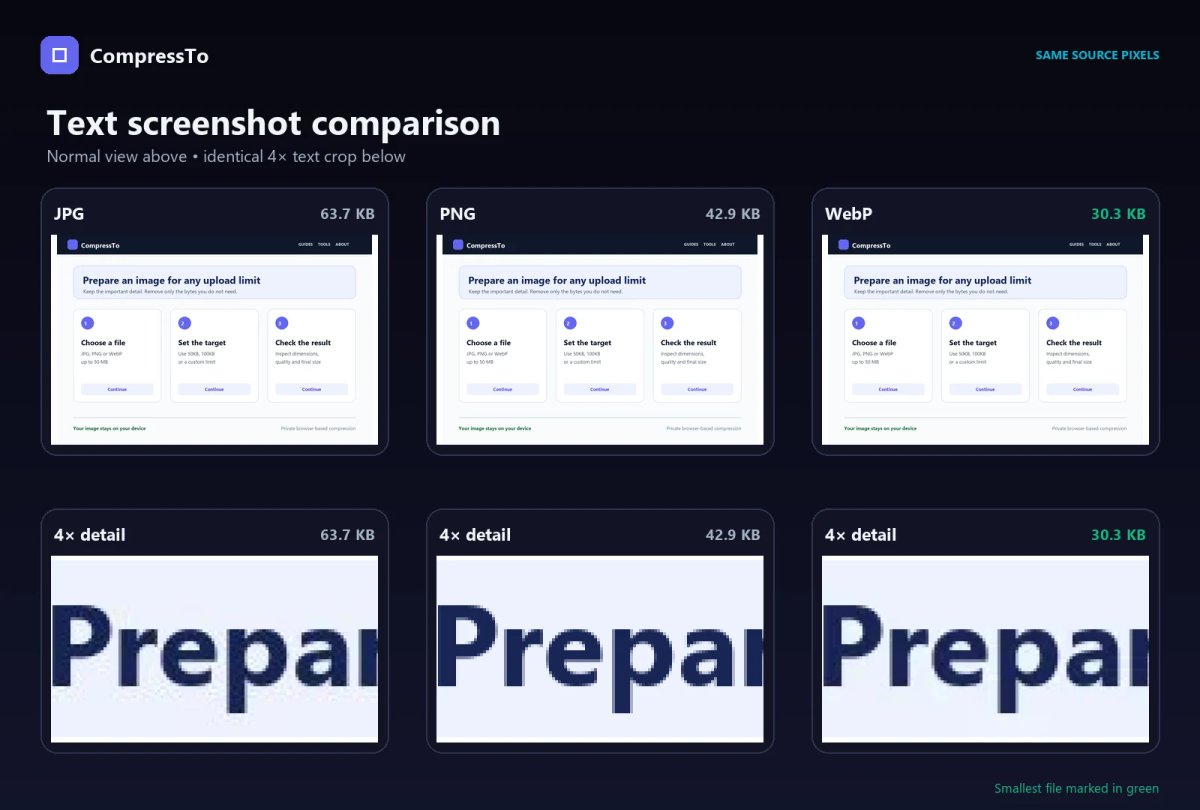
| Format | File size | What we observed |
|---|---|---|
| JPG | 63.7 KB | Largest result; fine text and high-contrast edges showed mild lossy artefacts |
| PNG | 42.9 KB | Pixel-exact text and edges; smaller than JPG in this test |
| WebP | 30.3 KB | Smallest result; clear at normal size with slight lossy softening under close inspection |
Winner for smallest size: WebP. It was about 29% smaller than PNG and 52% smaller than JPG.
This result shows why PNG should not automatically be described as “the largest format.” PNG compresses repeated colours and flat areas efficiently. Screenshots often contain large areas of the same background colour, predictable interface shapes and hard edges, so lossless PNG can perform surprisingly well.
The JPG version was not only larger than PNG here; it also introduced small changes around letters and borders. JPEG compression was designed primarily for continuous-tone imagery such as photographs, not crisp interface text.
Use PNG when every letter and pixel must remain exact—for example, software documentation, error-message screenshots or instructional graphics. Use WebP when the screenshot is primarily for a modern web page and a smaller download matters more than pixel-for-pixel preservation.
Test 3: A logo with transparency
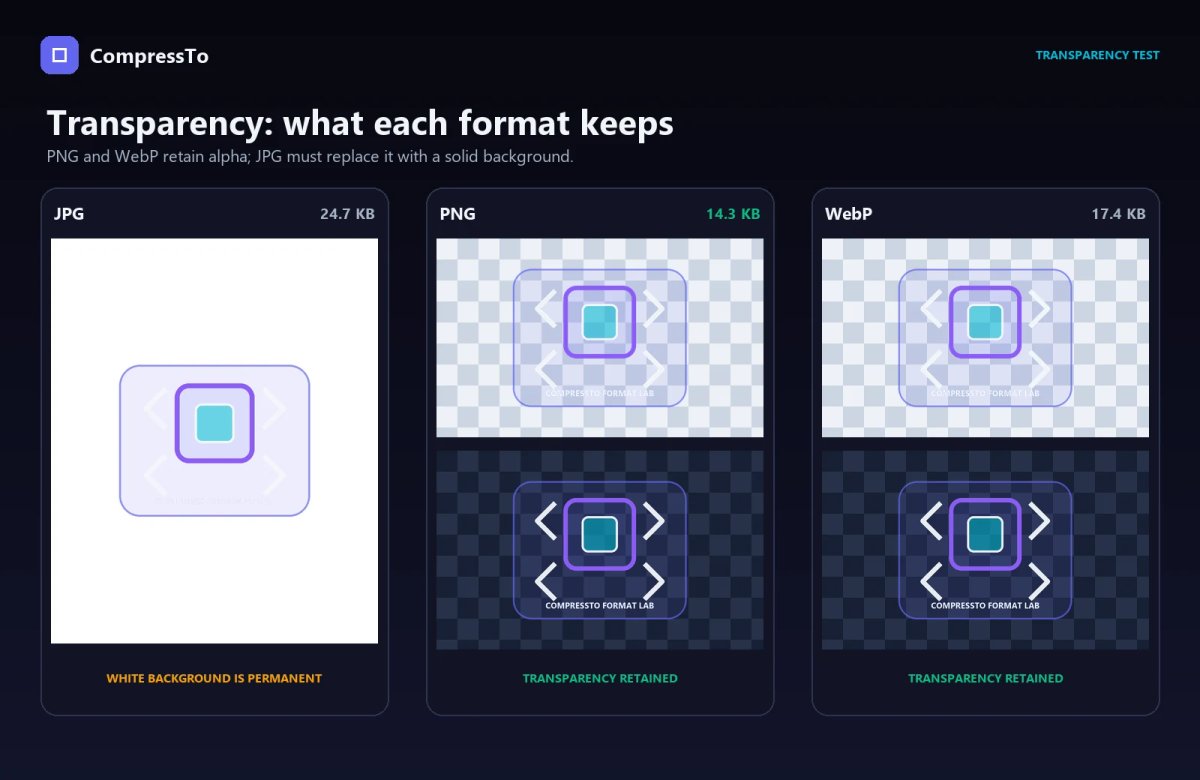
| Format | File size | Transparency | What we observed |
|---|---|---|---|
| JPG | 24.7 KB | No | Transparent area had to be replaced with white; mild edge artefacts appeared |
| PNG | 14.3 KB | Yes | Smallest file; exact shapes, colours and transparency |
| WebP | 17.4 KB | Yes | Retained transparency with slight lossy edge changes |
Winner for smallest size: PNG. It was about 18% smaller than WebP in this test.
This is a useful reminder that WebP does not win every comparison. The sparse transparent artwork compressed especially efficiently as lossless PNG, while the tested lossy WebP still needed more bytes.
PNG is also the better master file here. Logos are repeatedly placed on different backgrounds, resized and reused. A lossless PNG preserves the original raster pixels and transparency, while JPG permanently removes the transparent background.
For other website graphics, a WebP copy may still reduce delivery size. For the editable or reusable source, retain a lossless PNG—or preferably a vector SVG if the artwork is genuinely vector-based.
So, which format produced the smallest files?
| Test image | JPG | PNG | WebP | Smallest |
|---|---|---|---|---|
| Detailed photograph | 42.1 KB | 82.7 KB | 28.4 KB | WebP |
| Text-heavy screenshot | 63.7 KB | 42.9 KB | 30.3 KB | WebP |
| Transparent logo | 24.7 KB | 14.3 KB | 17.4 KB | PNG |
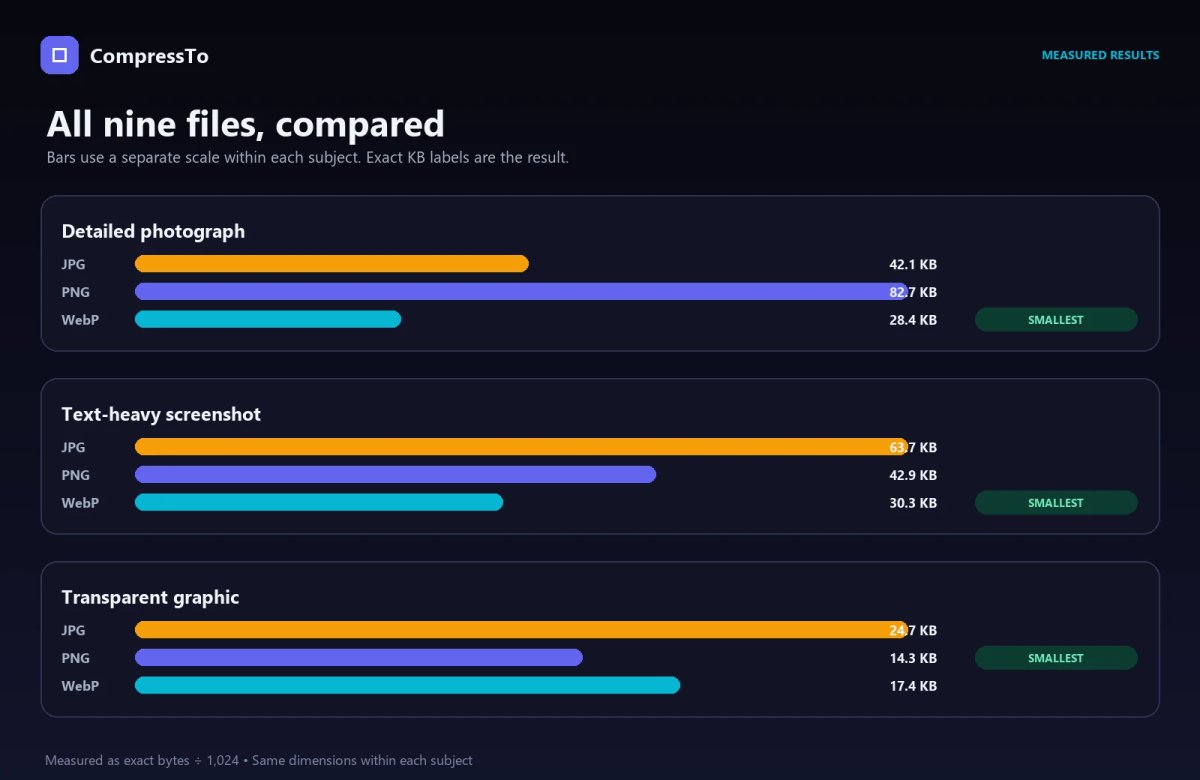
WebP produced the smallest file in two of the three tests. PNG produced the smallest transparent graphic. Neither result means every image will shrink by the same percentage or that one format is always the correct final choice.
File size varies with:
- Image dimensions
- Number and distribution of colours
- Fine detail and visual noise
- Transparency
- Encoder and optimization method
- Lossy quality setting
- Existing compression in the source file
- Metadata such as camera and location information
Google’s WebP documentation reports that, across its broader test datasets, lossless WebP files were 26% smaller than PNG and lossy WebP files were 25–34% smaller than comparable JPEG files at equivalent quality. Those are aggregate benchmark results, not a promise for each individual image.
Which format should you use?
Use JPG when:
- You are uploading a photograph to an online form that accepts JPG or JPEG.
- Maximum compatibility is more important than achieving the smallest possible file.
- The image does not require transparency.
- You need a simple photo file for email or general sharing.
If a portal requires a strict limit such as 50KB, 100KB or 200KB, check the accepted format before changing it. You can then compress the image to an exact target size and verify both its dimensions and final file size. Our 500KB, 200KB, 100KB and 50KB comparison shows how those ceilings affect a photograph, document and product graphic in production CompressTo tests.
Use PNG when:
- You need a transparent background.
- The image contains text, interface elements, diagrams or sharp lines.
- Pixel-exact preservation matters.
- You are keeping a lossless master copy of a raster graphic.
PNG is not automatically efficient for photographs. A camera image saved as PNG may be many times larger than a visually similar JPG.
Use WebP when:
- You are preparing images for a modern website.
- Reducing page weight and download time is important.
- You need transparency but want to test a potentially smaller alternative to PNG.
- The website, content-management system and downstream services all accept WebP.
Modern browsers support WebP broadly, and modern image formats can reduce download time and improve image-loading performance. Still, browser support is not the only compatibility question. Government portals, examination forms, older desktop software and third-party marketplaces may restrict uploads to JPG or PNG.
Does changing the extension convert the image?
No. Renaming photo.png to photo.jpg does not convert the image data. It only changes the filename. Some software may refuse to open it, while other software will detect that the internal file type does not match its extension.
A real conversion decodes the original pixels and encodes them in the new format. That process can also change transparency, metadata, colour handling and quality.
Does converting PNG to JPG always make it smaller?
No. Our text-heavy screenshot was 42.9 KB as PNG but 63.7 KB as JPG at the tested setting. For flat colours and crisp interface elements, PNG can outperform JPG while also preserving exact pixels.
For the detailed photograph-style image, the opposite happened: JPG was substantially smaller than PNG. The image content—not merely the extension—determines how efficiently a format can encode it.
What if an image must be below an exact KB limit?
Choosing the right format is only one part of reaching an exact file-size limit. You may also need to adjust quality, dimensions and metadata.
Start with the format the receiving website accepts. Then reduce quality gradually and resize only when necessary. Our guide to compressing an image to 100KB for online forms explains the practical workflow, while the exact-size compression guide explains why some images need more visible change than others.
If you are working from a phone, follow the iPhone and Android image-size guide to reduce the file without installing another app.
Final recommendation
There is no single best image format for every situation.
- Choose JPG for photographs and broad upload compatibility.
- Choose PNG for exact screenshots, sharp graphics and lossless transparency.
- Choose WebP for smaller modern web images when the complete publishing workflow supports it.
Our tests support WebP as an efficient delivery format, but they also reveal why context matters: PNG beat JPG for the screenshot, and PNG was both exact and smaller than lossy WebP for this particular transparent graphic.
Before uploading or publishing, ask two questions: What does the image contain? and What formats does the destination accept? The best result is not merely the smallest file—it is the smallest file that still preserves what the user needs.
Sources and test disclosure
- Google: An image format for the Web
- MDN: Image file type and format guide
- web.dev: Choose the right image format
- web.dev: Image performance
All three test subjects were created specifically for this CompressTo comparison by the deterministic project script. The scene is a synthetic photograph-style test image, not a camera photograph. Results were generated on August 5, 2026 with Pillow 12.2.0, libjpeg-turbo 3.1.4.1 and libwebp 1.6.0. Different encoders, quality settings and source images will produce different file sizes.